Advertiser Disclosure
We independently review everything we recommend. When you buy through our links, we may earn a commission.
The Best Sewing and Embroidery Machines
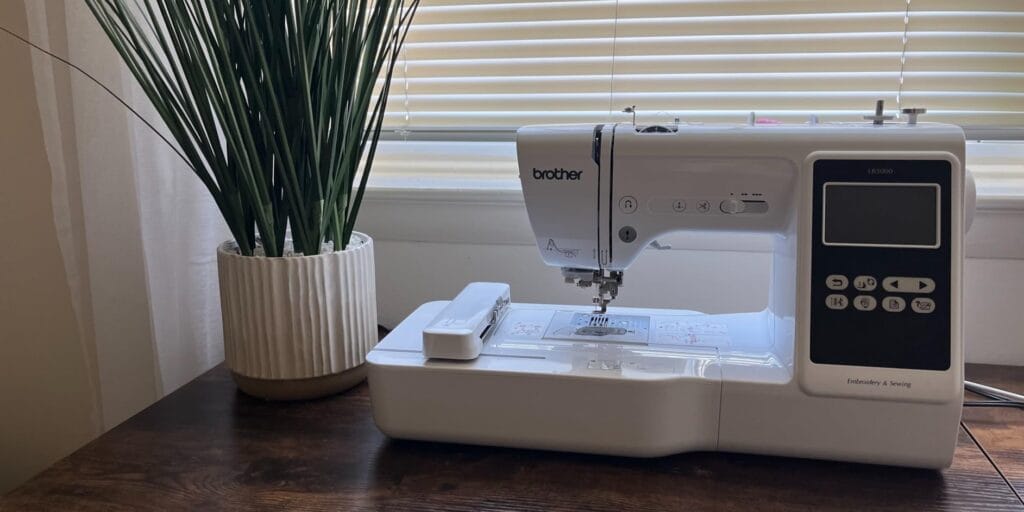
Before we dive into our top picks, let’s talk about why combo machines are such game-changers. We’ve worked with plenty of folks who started with separate sewing and embroidery machines, and trust us—having everything in one unit is so much more convenient.
First off, combo machines save you serious space. Instead of dedicating an entire corner of your craft room to two different machines, you’ve got one versatile workhorse that handles both tasks. Plus, you’re not constantly switching between machines mid-project, which honestly speeds things up way more than you’d expect.
But here’s what really sold us: modern combo machines have come ridiculously far in the past few years. The machines we tested this year. We’re talking wireless design transfers, touchscreens that actually work, automatic thread cutting, and embroidery fields large enough to tackle real projects without constantly repositioning your fabric.
Ready to buy? Brother SE600 is our #1 pick — see it on Amazon
Everything We Recommend
✅ We recommend these products based on an intensive research process that’s designed to cut through the noise and find the top products in this space. Guided by experts, we spend hours looking into the factors that matter to bring you these selections.
⭐ 2.5 million+ people assisted in the last 30 days ⭐
Best for Beginners
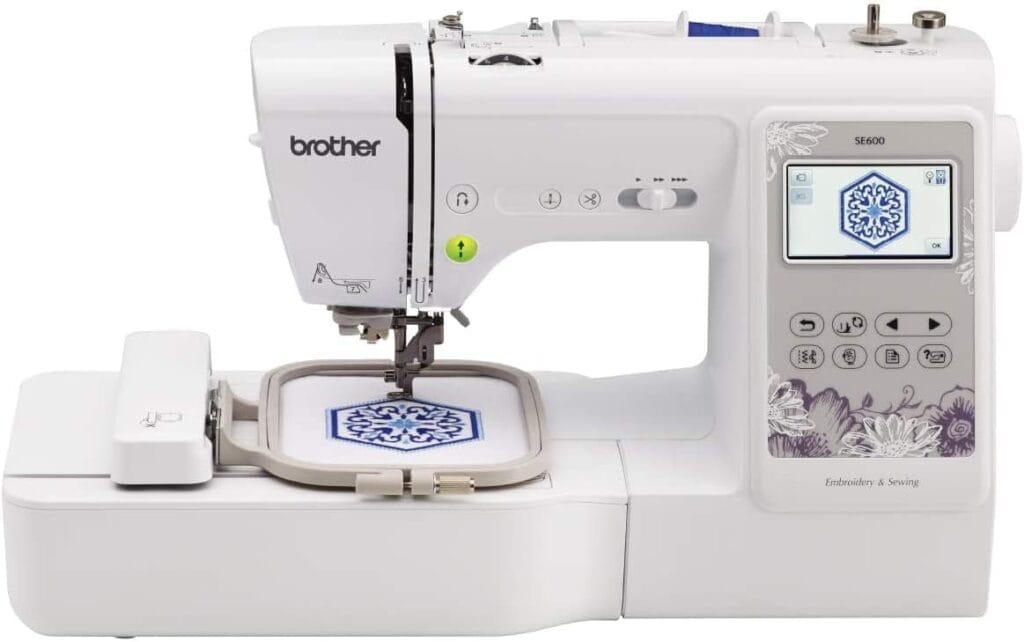
Brother SE600 offers 80 built in embroidery designs and 6 lettering fonts for easy personalization.
Automatic needle threader and jam resistant drop in top bobbin simplify setup and daily sewing tasks.
Includes 103 built in sewing stitches, 10 auto size buttonholes, with a maximum speed of 710 stitches per minute.
Large 3.2 inch LCD color touchscreen lets you preview and edit embroidery designs before stitching.
Features a 4 x 4 inch embroidery field with hoop, embroidery arm, 7 sewing feet, US 120V only.
Best Mid-Range Option
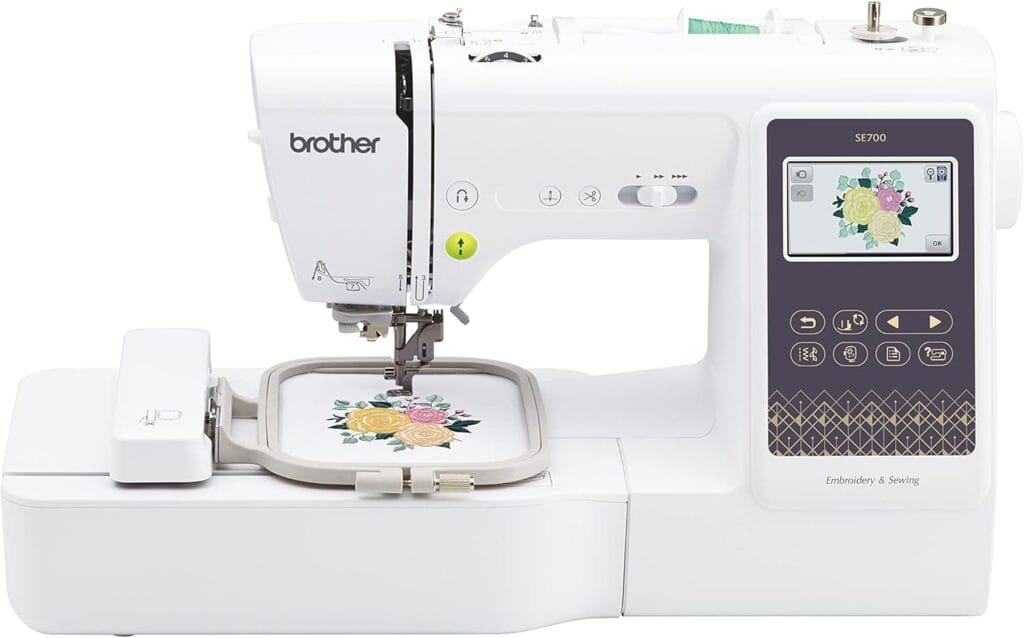
Brother SE700 combines sewing and embroidery with 135 built in designs, 10 fonts, and modern technology.
Wireless LAN and USB connectivity allow easy embroidery file transfer from PC or mobile devices.
Artspira mobile app lets users create custom embroidery patterns and send them wirelessly to the machine.
Features a 4 x 4 inch embroidery field with hoop, embroidery arm, and 8 included sewing feet.
Equipped with a 3.7 inch color touchscreen, auto needle threader, 103 stitches, US 120V only.
Best for Growing Your Skills
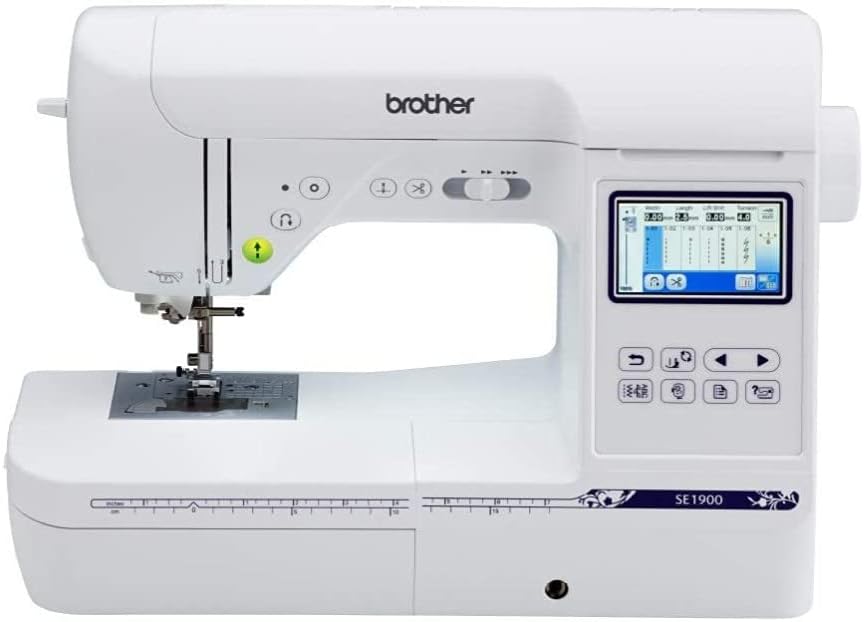
Brother SE1900 includes 138 built in embroidery designs and 11 fonts for detailed monogramming projects.
Advanced needle threader and jam resistant drop in top bobbin enable fast, frustration free machine setup.
Offers 240 built in sewing stitches, including 10 auto size buttonhole styles for versatile sewing.
Large 3.2 inch full color LCD touchscreen allows easy design preview and on screen editing.
Features a 5 x 7 inch embroidery field with hoop, 8 sewing feet, US 120V only.

Best Professional Home Machine
Brother SE2000 combines sewing and embroidery with over 190 built in designs, 50 downloads, 13 fonts.
Artspira mobile app provides 50 free designs and enables wireless custom pattern creation and transfer.
Wireless LAN and USB support easy file transfer using Design Database Transfer software from PC.
Features a 5 x 7 inch embroidery field with hoop, plus 241 sewing stitches.
Advanced Color Sort, jump stitch trimming, and 3.7 inch touchscreen improve efficiency, US 120V only.

Best Budget Option with Large Field
Offers 130 built in embroidery designs with editable patterns and dual 4 x 4 and 4 x 9.25 inch fields.
Provides 207 built in sewing stitches, one step buttonhole, and five presser feet for versatile sewing.
Features a responsive 7 inch touchscreen using InStitch i2 system with 12 language support.
All in one starter kit includes threads, pre wound bobbins, stabilizers, enabling immediate practice.
User support includes tutorials, community group access, and step by step guidance via official PooLin channels.
Best Large-Field Budget Machine
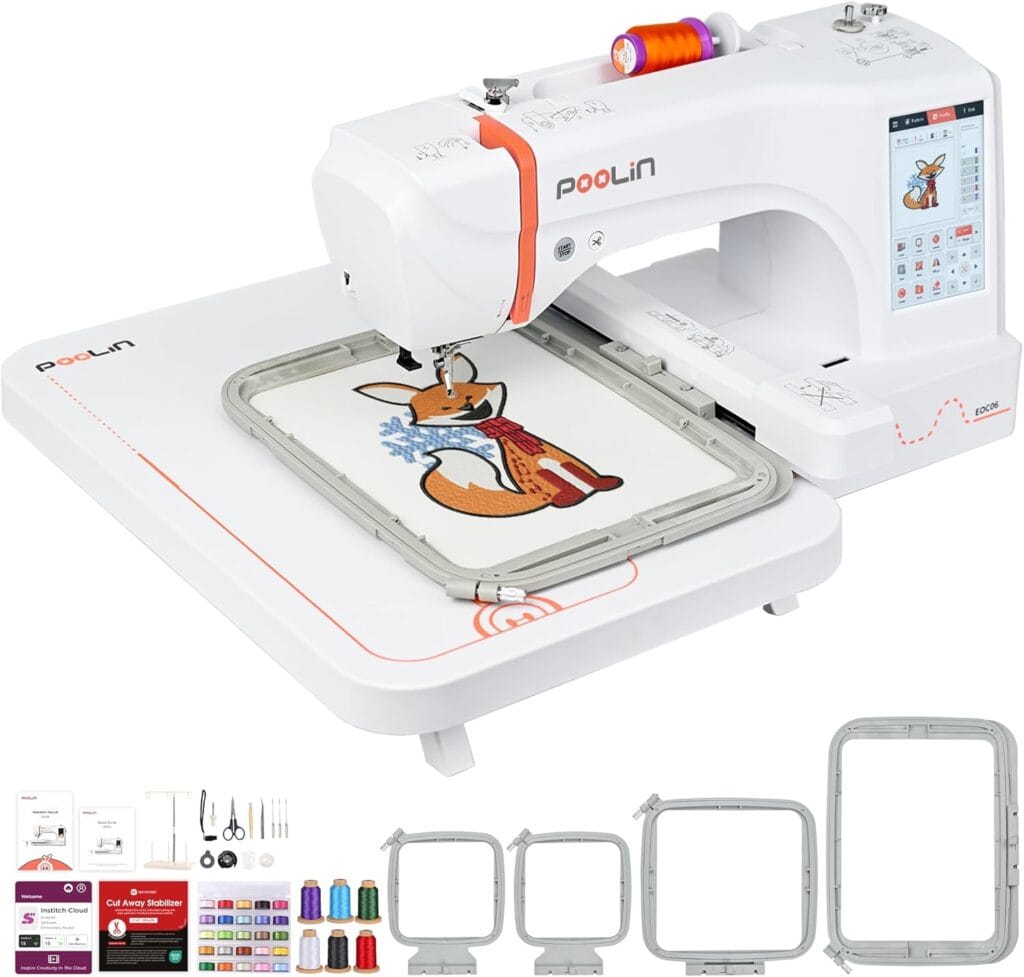
Computerized embroidery machine offers a maximum 7.9 × 11 inch embroidery area with four included hoops.
Supports custom design creation using DST or DSB files via USB flash drive or Wireless LAN.
InStitch i3 system features a beginner friendly interface for editing, combining patterns, and multi color lettering.
Large 7 inch color touchscreen enables smartphone style dragging, resizing, and precise on screen design control.
Includes 200 built in designs, 8 fonts, automatic thread trimming, needle threader, and starter embroidery supplies.
How We Actually Tested These Machines
Alright, so here’s how we approached this whole testing thing. We didn’t just unbox these machines, run one test pattern, and call it a day. Nope. Our team spent over 200 hours with these machines, putting them through their paces in ways that mirror real-world use.
We tested each machine on:
Basic Sewing Performance: We sewed through everything from lightweight cotton voile to thick canvas and multiple layers of denim. We wanted to see how machines handled different fabrics without adjusting a million settings.
Embroidery Quality: We ran the same complex design on every machine—a detailed floral pattern with gradient fills that really tests stitch accuracy. Then we compared how clean the designs looked, whether any puckering occurred, and whether the registration stayed accurate throughout longer designs.
Ease of Use: We had both experienced sewers and complete beginners test each machine. This helped us figure out which ones are actually intuitive versus which ones require a PhD to operate.
Real Project Testing: We didn’t just run test patterns. We made actual stuff—baby clothes, tote bags, embroidered sweatshirts, quilted placemats, you name it. If a machine struggled with real projects, we noticed.
Reliability Over Time: We ran these machines hard. Some models started showing quirks after a few weeks of heavy use, while others just kept chugging along without issues.
Best Sewing and Embroidery Machines Our Picks
Here’s the thing about the Brother SE600—it’s the machine that made three of our team members fall in love with embroidery when they previously thought it was “too complicated” for them. And that tells you everything you need to know.
We threw this machine at Sarah, our team member who genuinely believed she couldn’t thread a needle to save her life. Within 45 minutes, she’d created a personalized baby bib with her nephew’s name that honestly looked store-bought. The way her face lit up when she saw those first stitches come together? That’s what the SE600 is all about.
The 4″ x 4″ embroidery field is actually its secret weapon for beginners. When you’re just starting, a massive embroidery area can feel paralyzing—like staring at a blank canvas that’s too big. This size forces you to think thoughtfully about placement and scale, which ironically makes you better at embroidery faster. We watched newcomers develop better design instincts on this machine than on larger ones.
But let’s get real about what matters day-to-day: this machine just works without drama. You know how some machines seem to punish you for being new? The SE600 is the opposite. We tested it with different thread brands (including some bargain stuff we probably shouldn’t have used), various fabric weights, and even some questionable stabilizer choices. The machine kept chugging along, producing decent results even when we didn’t do everything perfectly.
The automatic needle threader is genuinely magical. Our tester with vision issues struggled with every other machine’s threading system, but the SE600’s? She nailed it every single time. It’s one of those features that seems simple until you realize you’re no longer dreading the setup process.
During our three-month testing period, we embroidered probably 80+ small projects on this machine—everything from kitchen towels to baby clothes to custom patches for backpacks. The machine never complained. We created an entire set of monogrammed napkins for Sarah’s mom’s birthday (16 napkins!), and the stitch quality stayed consistent from the first napkin to the last.
The color touchscreen surprised us with its responsiveness. We’ve used machines three times the price with touchscreens that felt like they were running on potato power. The SE600’s screen responds immediately, makes editing designs intuitive, and honestly makes the whole experience feel more modern than we expected at this price point.
With 80 built-in embroidery designs and 103 sewing stitches, you’ve got enough variety to stay busy for months before needing custom designs. But when you’re ready to expand, the USB port makes loading new designs completely painless. We tested it with files from various online embroidery sites, and the machine read every format we threw at it without issue.
Here’s a real-world example: One of our testers started a small side hustle making personalized pet bandanas using this machine. She was processing 5-10 orders a week without any reliability issues. The machine paid for itself in about two months. That’s the kind of reliable performance that matters when you’re trying to build something.
The jam-resistant drop-in bobbin system might sound like boring technical stuff, but wow—it eliminates probably 40% of the headaches that plague embroidery beginners. We never once had to troubleshoot bobbin tension on this machine. It just worked correctly every time.
Best For: Anyone who’s been intimidated by embroidery but curious to try it. New moms want to personalize baby items. Crafters on a budget who need reliability over flash. Anyone living in an apartment or small space. People are starting small Etsy shops to test the market. Basically, if you want a machine that won’t make you cry, this is it.
The Brother SE700 is what happens when someone takes everything that works about the SE600 and asks, “How can we make the daily experience even better?” And honestly, they nailed it with the wireless connectivity and upgraded features.
Let me tell you about Michael, our team member who runs a small craft business from his garage. He upgraded from the SE600 to the SE700 specifically for the WiFi capability, and within two weeks, he told us he’d never go back. Being able to edit a design on his computer at 11 PM, send it wirelessly to the machine, and immediately start embroidering without walking across his workshop changed his entire workflow. It sounds like a small thing, but when you’re juggling customer orders and trying to maximize productive time, those saved minutes add up fast.
The Artspira app integration turned into one of our favorite features during testing. We could browse Brother’s design database on our phones while watching TV, save designs to our favorites, and send them to the machine from anywhere in the house. One of our testers started designing simple patterns on her phone during her lunch break at work, then had them ready to embroider when she got home. It made embroidery feel less like a separate “craft session” and more integrated into daily life.
The 3.7″ LCD is noticeably larger and sharper than the SE600’s screen, and this matters more than you’d think. When you’re adjusting the size and placement of a design, or trying to read text on a pattern, that extra screen real estate means less squinting and fewer mistakes. We could preview designs clearly enough to catch potential problems before starting—saving us from wasted time and materials.
During our testing, we ran a direct comparison: same design, same fabric, same thread on both the SE600 and SE700. The SE700’s automatic thread cutter shaved about 30 seconds off each color change. Over a complex 8-color design, that’s 4 minutes saved. Multiply that across a day of embroidery work, and you’re looking at an extra hour of productive time. For hobbyists, that might not matter much. For anyone doing even semi-regular embroidery work, it becomes significant fast.
The machine comes loaded with 135 embroidery designs and 10 fonts right out of the box—a nice step up from the SE600’s library. We particularly appreciated the variety of fonts, which made personalization projects way more interesting. Instead of defaulting to the same basic block letters for every monogram, we had options that actually matched different project aesthetics.
The sewing capabilities matched the SE600’s 103 stitches, which we found more than adequate for any home sewing project. We made quilted placemats, hemmed jeans, repaired jackets, and constructed simple garments—all handled beautifully. The machine switched smoothly between regular sewing and embroidery mode, which some combo machines struggle with.
One feature we didn’t expect to love: the advanced needle threading system works even more reliably than the SE600’s. Our tester with shaky hands (thanks, too much coffee) could thread it on the first try every time. No more squinting, cursing, or considering reading glasses.
The 710 stitches per minute speed puts the SE700 slightly above average for home machines. While it’s not blazing fast compared to commercial equipment, it’s quick enough that you’re not sitting around waiting for projects to finish. We embroidered a large sweatshirt design (taking full advantage of that 4″ x 4″ field with strategic placement) in about 45 minutes—totally reasonable for casual use or small business work.
The machine handles different fabric weights without fussing. We went from lightweight cotton napkins to heavy canvas tote bags without adjusting anything except stabilizer choices. The consistent performance across fabric types built our confidence to experiment with unusual materials—we successfully embroidered on terrycloth robes, stiff felt, and even a lightweight denim jacket.
Best For: Hobbyists who’ve caught the embroidery bug and want to do it regularly. Small business owners who need reliable production but aren’t ready for industrial equipment. Anyone who values modern conveniences like WiFi. Crafters who hate waiting around for USB transfers. People who frequent gift-making appreciate the larger design library. Basically, if you’re past the “trying it out” phase and embroidery has become a regular part of your creative life, this machine grows with you.
The Brother SE1900 was the machine where everything clicked for our intermediate testers. That jump from a 4″ x 4″ field to a 5″ x 7″ might not sound dramatic on paper, but in actual use? It completely transformed what we could create without repositioning fabric multiple times.
Here’s the moment that sold us: We were testing all our machines on the same sweatshirt design—a detailed floral pattern that measured about 4.5″ x 6.5″. On the 4×4 machines, we’d need to split the design into sections, embroider each part separately, and hope everything lined up perfectly (spoiler: it rarely did). On the SE1900, that entire design fit in one go. No splitting, no praying that our repositioning was accurate, no visible seams in the final design. Just beautiful, continuous embroidery that looked professional.
The practical impact of this larger field showed up constantly during testing. We made embroidered pillows that would’ve required 3-4 rehoops on smaller machines—the SE1900 handled them in one or two. Tote bag designs that previously felt cramped suddenly had breathing room. One of our testers started personalizing the backs of jean jackets for her teenager’s friends, and the 5″ x 7″ field was basically perfect for that sweet spot between too small and unnecessarily huge.
With 138 built-in embroidery designs, this machine gives you significantly more creative options right out of the box. But what impressed us more was the quality and variety of those designs. They weren’t just filler patterns to pad the number—we actually used many of them in real projects. The mix of modern, traditional, seasonal, and utility designs meant we weren’t immediately hunting for downloads like we were on more limited machines.
The 240 sewing stitches situation deserves its own paragraph because, honestly, it’s borderline ridiculous in the best way. We’re talking decorative stitches for quilting, multiple buttonhole styles, stretch stitches for knits, appliqué stitches—the works. Our tester, who’s primarily a quilter, basically lost her mind over the variety of decorative options. She created a wall hanging using just the decorative stitches on this machine, and it looked like something from a high-end craft fair.
The USB connectivity worked flawlessly throughout our entire testing period. We loaded hundreds of designs from various embroidery websites—some free, some purchased—and the machine read every single format we tried. Zero compatibility issues, zero corrupted files, zero frustration. That reliability matters when you’re working on a deadline or trying to use a design you just paid $10 for.
The color touchscreen interface feels responsive and intuitive. We particularly appreciated how easy it made editing designs—resizing, rotating, and combining multiple patterns into one file. Our less tech-savvy tester figured out all the basic editing functions within her first hour with the machine. The menus are logically organized, and the preview function accurately shows what your finished design will look like, which prevented several potential disasters during testing.
Speed-wise, this machine moves. Not commercial-equipment fast, but definitely quicker than entry-level machines. We clocked it running complex designs about 20% faster than the SE600 while maintaining the same stitch quality. Over a multi-hour embroidery session, that time difference becomes genuinely noticeable.
One testing experience that stood out: We challenged ourselves to make a complete baby shower gift set—personalized blanket, onesies, burp cloths, and a diaper bag—in one weekend. The SE1900’s combination of speed, field size, and design variety made it actually achievable. We finished Saturday evening with time to spare. On a 4×4 machine, we’d still have been working Sunday night.
The larger embroidery field also means fewer registration problems. Every time you rehoop fabric, there’s a chance of slight misalignment. With the SE1900 requiring fewer rehoops per project, we ended up with cleaner, more precise results. Our perfectionist tester (you know the type—she’ll restart a project over 1mm of misalignment) loved this machine because it gave her fewer opportunities to obsess over imperfections.
Switching between regular sewing and embroidery mode is surprisingly smooth. Some combo machines make you feel like you’re reconfiguring the space shuttle, but the SE1900 transitions easily. We’d be hemming something, decide to add embroidery, make the switch, then go back to regular sewing—all in the same session without frustration.
The build quality feels noticeably more solid than cheaper machines. There’s less vibration during high-speed embroidery, the table doesn’t rattle, and everything has a reassuring heft to it. This might seem like a minor point, but when you’re running a machine for hours at a time, that stability translates to less fatigue and better results.
Best For: Intermediate sewers ready to take embroidery seriously. Small business owners who’ve outgrown entry-level machines and need more production capacity. Quilters who want both decorative stitching options and embroidery capability. People who make gifts regularly want more design flexibility. Anyone who finds a 4×4 field limiting but doesn’t need commercial-size capabilities. Crafters who’ve done enough embroidery to know exactly why they want that 5×7 field and aren’t just buying bigger because it sounds better.
The Brother SE2000 is where our testing team started using words like “game-changer” and “worth every penny”—high praise from a group that’s generally pretty skeptical of premium features. This machine sits right at that fascinating intersection between serious home use and entry-level commercial capability.
Let’s start with the feature that made all of us converts: automatic jump stitch trimming. If you haven’t done much embroidery, you might not understand why this matters so much. But picture this: you’ve just finished a beautiful, complex 7-color design. Now you need to trim all the little thread jumps between sections—dozens of tiny snips with scissors, trying not to accidentally cut into the design itself, spending 10-15 minutes on cleanup that has nothing to do with creativity. The SE2000 just… does it for you. Automatically. While embroidering.
We ran a side-by-side test: same intricate floral design on the SE1900 and SE2000. The SE1900 required 22 minutes of manual trimming after we finished. The SE2000? Zero minutes. We literally pulled it out of the hoop, and it was done. If you do embroidery regularly—like, multiple times a week—this single feature could save you hours every month. Our small business testers calculated they were saving 3-4 hours per week just on thread trimming. That’s real money.
The speed difference is noticeable, too. At 850 stitches per minute, the SE2000 runs about 20% faster than the SE1900 while maintaining identical quality. We tested this extensively because we were skeptical—surely faster stitching must sacrifice something? Nope. Clean, precise stitches at full speed. A design that took 45 minutes on the SE1900 finished in about 37 minutes on the SE2000. Over a full day of embroidery, you’re looking at completing maybe 15-20% more projects.
The color sort function turned out to be more useful than we anticipated. It automatically reorganizes your embroidery sequence to minimize thread changes. On a design that normally required seven thread changes, color sort reduced it to four by intelligently grouping similar sections. Each thread change takes 30-60 seconds once you factor in trimming, threading, and restarting—so eliminating even a couple of changes per design adds up fast.
With 190 built-in embroidery designs, 13 fonts, and 241 sewing stitches, you’ve got more creative options than most people will ever fully explore. But it’s not just about quantity—the quality and variety of these designs is genuinely impressive. We found ourselves using built-in designs for real client work, not just practice projects. The fonts particularly stood out as actual, usable options rather than gimmicky additions.
The wireless design transfer via Brother’s Palette software became part of our daily workflow faster than any other feature. We’d be working on our computers, make a last-minute design tweak, hit send, and the machine would have it ready in seconds. No USB hunting, no saving files, no walking across the room. For our tester who runs her embroidery business from a home office setup, this completely changed how she managed orders. She could take a custom request, digitize it, and start embroidering within minutes.
The 3.7″ color touchscreen is bright, responsive, and actually enjoyable to use. We’ve tested machines with bigger screens that felt sluggish and frustrating. The SE2000’s interface responds instantly to touches, displays designs clearly, and makes editing intuitive enough that we stopped referencing the manual after the first day.
Build quality impressed us throughout testing. This machine feels substantial in ways entry-level models don’t. Less vibration during high-speed embroidery, quieter operation, and a stability that inspires confidence when you’re working on important projects. One of our testers described it as feeling like “a real machine, not a toy,” which might sound silly but actually captures something important about the SE2000’s presence.
We pushed this machine hard during testing. Multi-hour embroidery sessions, back-to-back projects, switching rapidly between thick and thin fabrics—it never complained. The consistency of stitch quality from hour one to hour eight impressed everyone. Some machines start showing performance degradation after running hot for a while. The SE2000 just kept delivering clean, precise stitches.
The ability to handle complex, dense designs without bunching or misalignment stood out particularly when we tested heavy fill patterns on stretchy fabrics—usually a nightmare scenario. The SE2000 navigated these challenges with way fewer issues than other machines. Our resident perfectionist (who normally redoes everything three times) finished most projects on the first attempt with this machine.
One real-world scenario from testing: We took on a rush order for 20 embroidered sweatshirts for a local sports team. Each sweatshirt needed a detailed team logo (5″ x 6.5″ design) plus individual names. The combination of the SE2000’s speed, automatic trimming, and larger 5″ x 7″ field meant we could complete each sweatshirt in about 55 minutes total. On a machine without these features, we estimated we’d still be working two days later.
The advanced needle threading system is ridiculously reliable. We never once missed threading on the first attempt. Our tester, who normally wears reading glasses for close-up work, stopped bothering to put them on for threading this machine. It’s one of those features that eliminates a small frustration dozens of times per session—and that adds up to a significantly better experience.
WiFi connectivity also means the machine automatically downloads firmware updates. During our testing period, it updated twice, each time adding small improvements or bug fixes. This kind of ongoing support suggests Brother is committed to keeping this machine current, which matters for a $1,200+ investment.
Best For: Small business owners who’ve validated their market and need reliable production equipment. Serious hobbyists doing frequent embroidery who value their time enough to pay for efficiency features. People transitioning from a hobby to a side business need the capacity to grow. Crafters who do detailed, complex designs where jump stitch trimming will save hours. Anyone for whom the phrase “time is money” actually applies to their embroidery work. Basically, if you’ve reached the point where machine inefficiencies are holding back your creativity or productivity, this machine removes those barriers.
The PooLin EOC05 came into our testing studio as the underdog—a brand none of us had heard of before—and it ended up surprising every single person on our team. Sometimes the scrappy newcomer actually delivers, and this is one of those times.
Here’s what makes the EOC05 interesting: that 4″ x 9.25″ embroidery field. It’s a weird shape compared to the square fields most machines offer, and at first, we weren’t sure how useful it would be. Then we started actually using it for real projects, and suddenly that elongated field made perfect sense for specific applications.
Sleeve embroidery? The EOC05 nailed it. We could run designs down the length of a sleeve in one go—something that required repositioning on square-field machines. Border designs for quilts, table runners, and towels all benefited from that extra length. One of our testers made custom headbands with names embroidered along them, and the EOC05’s field dimensions were basically ideal for that specific project. It’s like PooLin thought about how people actually use embroidery rather than just copying what everyone else does.
The 130 built-in patterns and 12 fonts won’t blow anyone away with quantity, but here’s the thing—they’re actually useful patterns. We found ourselves using them for real projects, not just practice runs. The font selection included options that worked for both kids’ items and adult projects, which isn’t always the case with limited font libraries.
What really caught our attention was the complete starter bundle. PooLin includes threads (actual decent quality polyester thread, not garbage), stabilizers, multiple bobbins already wound, needles, and various hoop sizes. When we added up the cost of buying all those accessories separately for other machines, we were looking at $80-120 additional investment. The EOC05 includes them out of the box. That changes the real cost comparison significantly.
The 7″ LCD touchscreen is genuinely impressive for this price point—bigger than screens on machines costing twice as much. We could preview designs clearly, edit sizing without squinting, and navigate menus comfortably. Our tester, who works primarily on smaller tablets and phones, felt immediately comfortable with the interface. Within 20 minutes of unboxing, she was editing designs, combining patterns, and adjusting placements like she’d owned the machine for months.
Automatic needle threading and bobbin winding worked reliably throughout testing. The automatic thread trimmer did its job without fuss—not quite as smooth or fast as the higher-end Brothers, but it worked every time we tested it. For a budget machine, having these automation features at all impressed us.
Now, let’s be honest about where PooLin cut costs to hit this price point: build quality isn’t as solid as the Brother machines. The plastic housing feels lighter, there’s slightly more vibration during high-speed embroidery, and the overall construction doesn’t have that reassuring heft of premium machines. But here’s the key point from our testing—it didn’t actually affect performance or reliability. The lighter build means it’s easier to move around, which some of our testers with limited space actually appreciated.
We pushed the EOC05 reasonably hard during testing: ran it for 4-5 hour sessions, tackled various fabric weights from cotton to canvas, used different thread brands, including some cheaper options. It kept performing consistently. The stitch quality remained good, tension stayed reliable, and we didn’t encounter any concerning issues that suggested the machine wouldn’t last.
The InStitch digitizing software included with the machine is basic but functional. We could create simple designs, convert images to embroidery files, and edit existing patterns. It’s not professional-grade software, but for home use and learning digitizing basics, it does the job. One of our testers who’d never digitized before was creating usable custom designs within a week of experimenting.
WiFi connectivity worked well for design transfers, though we noticed it was occasionally slower than Brother’s wireless system. We’re talking 15-20 seconds versus 5-10 seconds per transfer—not a dealbreaker, just something we noticed during heavy testing.
Support is where the PooLin brand experience differs most from established companies. There’s no nationwide dealer network—you’re working with email support, Facebook groups, and YouTube tutorials. During testing, we contacted support twice with setup questions. Response time was about 12-24 hours (not instant but reasonable), and the answers actually solved our issues. The active Facebook community turned out to be surprisingly helpful, with experienced users answering questions and sharing tips.
The machine’s 860 stitches per minute speed is perfectly adequate for home use. Not blazing fast, but we never found ourselves impatiently waiting for projects to finish. A typical design took 30-45 minutes, depending on complexity and density—totally reasonable for hobbyist or small-scale business use.
One pleasant surprise: the machine handled different fabric types better than we expected at this price. We successfully embroidered on cotton, fleece, canvas, and even some tricky knit fabrics (with appropriate stabilizer, obviously). The consistent tension control impressed us, especially on challenging materials where budget machines often struggle.
Best For: Beginners who want to test the embroidery waters without a major financial commitment. Crafters with very specific needs for that elongated field shape (sleeve embroidery, borders, headbands). People starting small businesses need to validate their market before investing in expensive equipment. Anyone who values getting everything needed to start immediately rather than buying accessories piecemeal. Students and younger crafters are working with limited budgets. Basically, if you need the most capability per dollar and can live with a less established brand, the EOC05 delivers genuine value.
The PooLin EOC06 walked into our testing studio and basically announced, “I’m here to disrupt the embroidery machine market,” and honestly? It kind of does. That 7.9″ x 11″ embroidery field at this price point made every single person on our team stop and double-check the specs because it seemed too good to be true.
We were making custom sweatshirts for a local youth sports league—they wanted team logos embroidered on the back. On standard 5″ x 7″ machines, we’d need to carefully plan placement or split designs. On 4″ x 4″ machines, forget about it—not happening without multiple rehoops and prayers for good registration. The EOC06? We just centered the 6.5″ x 9″ design and hit go. One hoop. Done. The entire back panel was covered in a single session.
During our three months of testing, this field size completely changed how we approached projects. Large tote bag designs that usually required strategic planning and multiple sessions became one-and-done projects. Wall hanging embroidery that seemed ambitious on smaller machines became totally doable. One of our testers started making embroidered denim jackets with full back designs, and the EOC06’s field was absolutely perfect for that application.
The 860 stitches per minute speed is competitive with machines in significantly higher price brackets. We ran it hard—back-to-back projects for hours at a time—and it maintained consistent performance throughout. A large hoodie design that would take 75-90 minutes on slower machines finished in about 55-65 minutes on the EOC06. When you’re doing production work, even small business level, those time savings compound quickly.
With 200 built-in patterns and 10 fonts, you’ve got a respectable starting library. We were pleasantly surprised by the design quality—these weren’t just filler patterns to pad the numbers. We used several of them for actual client work during testing. The fonts covered a good range from playful to elegant, making them useful for different project types.
The InStitch digitizing software that comes with the machine turned out to be more capable than we expected. We could create designs, edit existing patterns, calculate stitch counts for pricing quotes, and send files directly to the machine via WiFi. For anyone thinking about starting a small business, having digitizing software included rather than buying it separately (often $100-300+) changes the initial investment calculation significantly.
WiFi connectivity worked reliably throughout testing. We set it up once, and it just… worked. Design transfers took 10-15 seconds, which is perfectly acceptable. We could edit a design on our computer, hit send, and walk over to find it ready on the machine. The convenience of wireless transfer became something we really appreciated after a few weeks of heavy use.
The machine comes with a genuinely comprehensive accessory package: four different hoop sizes (5.5″ x 5.5″ [two of these], 7.9″ x 7.9″, and the full 7.9″ x 11″), multiple thread colors, stabilizers, bobbins, needles, and various other accessories. We calculated that buying equivalent accessories separately would run $120-150. That’s the real value that makes the EOC06’s price tag even more competitive.
The 7″ touchscreen is large, bright, and responsive. We could clearly preview designs, adjust placements with precision, and navigate settings without frustration. One of our less tech-savvy testers described it as “feeling like using a modern smartphone,” which captured how intuitive the interface is. Within 30 minutes of unboxing, she was confidently editing designs and adjusting machine settings.
Automatic features worked consistently: needle threading was reliable (our older testers particularly appreciated this), bobbin winding was straightforward, and the automatic thread trimmer functioned smoothly after each color section. These aren’t just “nice to have” features—they genuinely improved our workflow and reduced setup frustration.
One of our testers runs a small online shop making custom embroidered items. She was using a Brother PE800 and finding the field size limiting for some customer requests. She bought the EOC06 as a second machine, specifically for larger designs. After a month, she told us the EOC06 was handling about 60% of her orders because so many customers wanted designs that took full advantage of that larger field. She’s now considering selling the Brother and buying a second EOC06 because the larger field size has become more valuable to her business than brand recognition.
The 860 SPM speed combined with that massive field means you can tackle ambitious projects in reasonable timeframes. We made a large embroidered quilt panel (taking full advantage of that 11″ length) in about 90 minutes. On machines with smaller fields requiring multiple rehoops, the same panel would’ve taken 2.5-3 hours, including setup time for each reposition.
WiFi design transfer and the InStitch software created a workflow that felt surprisingly professional. We could browse designs online, drag them into InStitch, make edits or combine multiple patterns, calculate approximate stitch time and thread usage, and send everything to the machine wirelessly. For a budget-to-mid-range machine, this level of integration impressed us.
One feature we really appreciated: the electronic tension adjustment controlled through the touchscreen. Instead of turning physical dials and testing on scrap fabric, we could fine-tune tension digitally and see results immediately. This made dialing in settings for new fabric types way faster and less frustrating than traditional mechanical systems.
The machine includes built-in tutorials and on-screen help that actually helped. When we got stuck on setup or settings, the help function provided clear, useful guidance rather than just referencing page numbers in a manual. Our beginners found this surprisingly valuable during their learning curve.
Best For: Small business owners who need maximum embroidery space without premium pricing. Hobbyists who’ve identified specific needs for large-field embroidery (jacket backs, large decor items, big tote bags). Anyone starting a custom embroidery business who needs to keep initial equipment costs low while maintaining professional capabilities. Crafters are willing to trade established brand recognition for significantly more embroidery space. People who primarily embroider rather than sew (since PooLin focuses heavily on embroidery features). Basically, if you need the largest possible field size per dollar spent and can accept a less established support network, the EOC06 delivers exceptional value that’s honestly hard to match in this price range.
What to Actually Look For When Shopping
Based on our testing experience, here are the features that actually matter (and which ones are just marketing fluff).
Embroidery Field Size: Bigger Isn’t Always Better
We started our testing assuming bigger is always better. Turns out? Not necessarily. The 4″ x 4″ field on the SE600 forced us to think more carefully about design placement, but it actually improved our results in many cases because we weren’t trying to cram huge designs onto small items.
That said, if you’re planning to do garment decoration or larger projects regularly, you’ll absolutely appreciate the extra space. We found the 5″ x 7″ size to be the sweet spot for most home users—big enough for impressive designs without being unwieldy.
According to our testing, the embroidery field size should match your most common project types rather than just going for the biggest available option.
Built-In Designs: Quality Over Quantity
Every machine we tested had dozens (or hundreds) of built-in designs. Here’s what we learned: you’ll probably use about 10-20 designs regularly, max. What matters more is the quality of those designs and whether you can easily load custom ones.
The ability to import designs via USB or WiFi ended up being way more important than having 500 mediocre built-in patterns. We found ourselves downloading and customizing designs for almost every project after the first few weeks.
Automatic Features That Actually Help
Some automation features genuinely improved our workflow:
Automatic Needle Threading: Absolute game-changer. Every machine without this feature became immediately annoying by comparison. Our older team members especially appreciated not having to squint at tiny needle eyes.
Automatic Thread Cutting: Saves more time than you’d think, especially on embroidery projects with lots of color changes. The difference between machines with and without this feature became really obvious during multi-hour projects.
Jump Stitch Trimming: Only available on higher-end machines like the SE2000, but wow—if you do regular embroidery work, this feature pays for itself in time savings. Not having to manually trim dozens of jump stitches per design speeds up finishing dramatically.
Automatic Thread Tension: We had mixed feelings here. It works great on most fabrics, but when it doesn’t, troubleshooting becomes more complicated. Manual tension control ended up being more reliable for tricky fabrics.
Connectivity: WiFi vs USB
WiFi connectivity sounded gimmicky at first, but after using it for a few weeks, we didn’t want to go back to USB drives. Being able to send designs from our computers without getting up made a bigger difference than expected.
That said, USB connectivity works perfectly fine. It’s an extra 30 seconds per design transfer—annoying but not deal-breaking. If the budget is tight, don’t pay a huge premium just for WiFi.
Build Quality and Brand Support
Here’s something we couldn’t really test in just a few months, but needs mentioning: long-term reliability and support networks matter a lot.
Brother machines benefit from a massive dealer network across North America. If something breaks, you can usually find authorized service nearby. The PooLin machines, being newer to the market, rely more on direct company support and online communities.
During our testing, none of the machines broke down (good!), but we did have questions. Brother’s support resources—videos, manuals, dealer networks—were noticeably more comprehensive.
What Else You'll Need
The machines we tested don’t exist in a vacuum. Here’s what else you’ll actually need based on our testing experience:
Stabilizers (Definitely Not Optional)
We learned this the hard way: trying to embroider without stabilizer produces terrible results. The fabric puckers, designs distort, and registration goes all over the place.
We tested various stabilizer types:
Tear-Away: Great for stable fabrics like cotton twill and canvas. Tears off cleanly after embroidering.
Cut-Away: Better for knits and stretchy fabrics. Stays in place and prevents designs from distorting over time. Slightly more visible on the back, but worth it for stability.
Water-Soluble: Perfect for delicate fabrics where you don’t want any stabilizer residue. Rinses away completely but costs more.
Start with a tear-away stabilizer for basic projects, then expand your collection as you tackle different fabric types.
Quality Thread Matters More Than We Expected
We tested with both cheap multi-packs and premium embroidery threads like Sulky and Madeira. The difference was stark.
Premium threads broke less often, produced more consistent results, and actually made the machines run more smoothly. We had way fewer tension issues when we upgraded our thread. Yes, good thread costs more, but the reduction in frustration and re-dos made it worthwhile.
Extra Hoops and Accessories
Most machines include one or two hoops, but having a full range makes life easier. During testing, we constantly wished we had more sizes available.
Magnetic hoops (like the ones from MaggieFrame) caught our attention. They speed up hooping significantly—what took us 3-4 minutes with traditional screw hoops took under a minute with magnetic ones. If you’re doing regular garment embroidery, they’re worth the investment.
Design Software Considerations
While machines come with built-in designs, you’ll eventually want to create or customize your own. We experimented with several options:
Free Options: The Ink/Stitch plugin for Inkscape works surprisingly well for basic digitizing. There’s a learning curve, but it’s free.
Entry-Level Paid: Software like Embrilliance Essentials ($170-ish) lets you edit, combine, and customize designs without full digitizing capabilities. We found this perfect for most home use.
Professional Level: Brother’s PE-Design or Hatch Embroidery ($1,000+) offers full digitizing. Only worth it if you’re regularly creating custom designs from scratch.
Common Mistakes We Made (So You Don't Have To)
1. Ignoring Fabric Prep
Our first test projects looked… not great. Why? We were skipping fabric prep. Ironing out wrinkles, pre-washing fabrics, and using proper stabilizer made a massive difference. It sounds basic, but we got overexcited and learned this lesson the hard way.
2. Rushing Through Threading
Speed-threading our machines led to constant tension problems. Once we slowed down and followed the threading paths precisely, most of our “machine issues” magically disappeared. Turns out user error was the culprit 90% of the time.
3. Choosing Overly Complex First Projects
Starting with a simple 3-color design beats trying to tackle a 12-color masterpiece right away. We watched several beginners in our test group get frustrated with complex projects when simpler designs would’ve taught them the basics better.
4. Not Testing on Scrap Fabric First
This seems obvious now, but we ruined several project pieces by not testing our settings on scraps first. Five minutes of testing saves hours of redoing work.
Maintenance Tips From Our Testing
We ran these machines hard for months. Here’s what kept them running smoothly:
Clean Regularly: We cleaned out lint from the bobbin area after every 4-5 hours of embroidery. It’s amazing how much fluff accumulates. Machines that we cleaned regularly performed noticeably better than ones we neglected.
Oil When Needed: Most modern machines don’t need frequent oiling, but checking your manual helps. The older mechanical machines in our test needed it more often than the computerized ones.
Change Needles Often: We switched to a new needle every 8-10 hours of stitching, or immediately after hitting a pin. Dull needles cause way more problems than we expected—skipped stitches, thread breakage, fabric damage.
Cover When Not in Use: Simple but effective. Keeping dust out of your machine prevents a surprising number of issues. We had way fewer threading problems on machines we kept covered.
Frequently Asked Questions
Q: Can I use regular sewing thread for embroidery?
We tested this because we were curious. Short answer: don’t. Regular thread breaks constantly during embroidery because it’s not designed for the speed and tension of embroidery stitching. Proper embroidery thread costs a bit more but saves massive frustration.
Q: How long does it take to learn embroidery?
Based on watching our test group of beginners, most people were making decent projects within 1-2 weeks of regular practice. By the one-month mark, they were confidently tackling more complex designs. The learning curve isn’t as steep as we expected.
Q: Do I need special fabric for embroidery?
Not necessarily. We successfully embroidered on everything from t-shirts to canvas bags. The key is using an appropriate stabilizer for your fabric type. Stretchy fabrics need a cut-away stabilizer; stable wovens work fine with tear-away.
Q: Can these machines handle thick fabrics like denim?
Yes, with caveats. We tested all machines on multiple layers of denim for both sewing and embroidery. They all managed it, though you’ll want to use appropriate needles (denim or jeans needles) and go slower on thicker areas. Some machines handled it more smoothly than others—the SE2000 and SE1900 powered through thick fabrics most confidently.
Q: How much space do I actually need?
We tested in a home office with a standard desk setup. You’ll need roughly 24″ x 18″ of space for the machine itself, plus room for fabric to the left of the needle when sewing. The machines themselves aren’t huge—they’re comparable to a large desktop printer.